Your Firm.
Their Search.
Be Found.
A practical guide to making your Google Business Profile work harder for your law firm.
How to Optimize Your Law Firm's Google Business Profile
When someone searches Google for a divorce attorney, an estate planning lawyer, or a firm that handles employment disputes, they aren't necessarily greeted by a traditional list of websites. Often, Google presents a map accompanied by several local businesses, complete with reviews, photographs, contact information, and directions. A prospective client can compare attorneys, read reviews, and make a phone call without ever visiting a law firm's website.
That makes your Google Business Profile one of the most important pieces of digital real estate your firm controls. Unlike a website redesign, improving your profile doesn't necessarily require a developer, an advertising budget, or weeks of planning. It does, however, require some attention to detail, particularly when it comes to how your firm is categorized, how its services are described, and what prospective clients discover when they find you.
The good news is that Google provides the tools to manage much of this information yourself. The challenge is knowing which details matter, where to find them, and how to use them effectively. In this guide, we'll walk through the essential elements of a well-maintained Google Business Profile, with practical suggestions you can put to work for your own law firm.
Claim and Review Your Google Business Profile
Before you can improve your firm's presence on Google, you need to make sure you control the information appearing in its business listing. Your firm may already have a profile, even if nobody in the office remembers creating one. Google can generate business listings using information from publicly available sources, so the first task is to locate your firm's profile and determine whether it has been claimed.
Visit Google's Business Profile website and sign in with the Google account associated with your practice. If your firm already appears in Google Search or Maps, follow the available steps to claim or request access to the listing. Google may require verification before you can manage certain information. If another person already manages the profile, you may need to request access rather than create a duplicate listing.
Open Google Business Profile →Start With an Accuracy Check
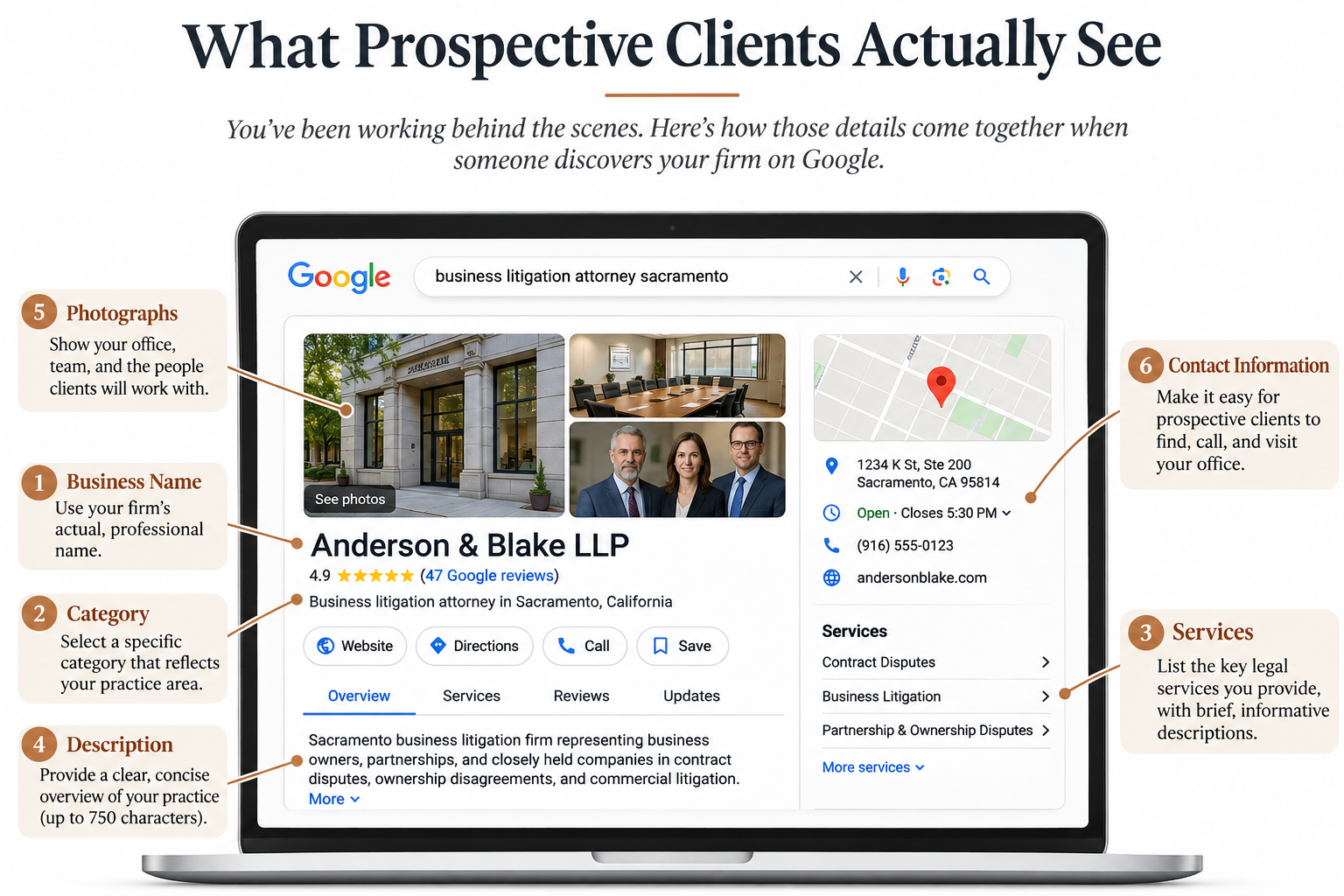
Once you have access, review the basic information prospective clients rely on when deciding whether to contact your firm. That includes your business name, office address, telephone number, website, hours of operation, and primary business category. Make sure the information accurately reflects your practice as it operates today.
These details may seem elementary, but inconsistencies can create unnecessary obstacles for prospective clients. An outdated telephone number, incorrect office location, or inaccurate business hours can turn a promising inquiry into a frustrating experience. Before attempting anything more sophisticated, make sure the fundamentals are right.
Choose the Right Business Category
One of the most consequential decisions you'll make when setting up your Google Business Profile is how to categorize your practice. Google uses business categories to understand what a business does and determine which searches may be relevant to it. A category that accurately describes your principal practice area can provide more useful information than a broad designation that says little about the legal services you offer.
Google allows you to select one primary category and, where appropriate, additional categories. Your primary category should describe the firm's core business as specifically as Google's available options permit. For a practice devoted primarily to personal injury litigation, for example, "Personal Injury Attorney" may be more descriptive than the general "Law Firm" category. The objective isn't to accumulate categories, but to select the ones that genuinely represent your practice.
What Does Your Firm Actually Do?
These are illustrative category examples. Available category names may vary, and Google determines which options can be selected.
How to Change Your Category
Sign in to the Google account that manages your Business Profile. Find your business in Google Search or Maps, select Edit profile, and locate Business category. Choose the most accurate primary category from Google's available options, then add secondary categories only if they describe other substantial areas of your practice. Save your changes and review the updated information.
Resist the temptation to select every legal category that might conceivably generate an inquiry. A firm concentrating on estate planning shouldn't present itself as a criminal defense practice simply because an attorney occasionally handles an unrelated matter. Google advises businesses to use as few categories as necessary to describe their core operations. Accuracy is a better starting point than trying to outsmart the search engine.
Give Your Practice Areas Some Substance
Your business category tells Google what kind of law firm you operate. Your services provide an opportunity to explain the particular legal matters you handle. That's an important distinction, especially for practices that serve clients with very different problems within the same general area of law.
Consider an employment law firm. Someone facing termination after reporting workplace misconduct may not be searching for an "employment attorney" in those exact words. They may be looking for help with retaliation, wrongful termination, or discrimination. Describing those services clearly helps prospective clients recognize that your practice handles the problem they're experiencing.
The Difference a Description Makes
Employment Law
We provide experienced representation in employment law matters and are dedicated to protecting our clients' rights.
Workplace Retaliation
Representation for employees who experience termination, demotion, or other adverse treatment after reporting workplace misconduct or exercising legally protected rights.
The second example doesn't rely on exaggerated claims or marketing jargon. It identifies a recognizable legal problem and explains the service in terms a prospective client can understand. The same principle applies to estate planning, business litigation, landlord-tenant law, family law, and virtually every other practice area.
How to Add or Edit Services
Sign in to the Google account managing your Business Profile and locate your firm in Google Search or Maps. Look for Edit services in the profile management controls. Depending on your business category and available features, you may be able to select suggested services, add custom services, and provide descriptions. Save your changes and review how the information appears on your listing.
I'd start with the practice-area pages already published on your firm's website. They should provide a useful inventory of the matters your attorneys handle. From there, identify the individual services that deserve their own descriptions, using language that reflects the questions and concerns clients actually bring to your office.
There's no advantage in describing services your firm doesn't provide, and more text isn't necessarily better. The objective is to make your profile more informative, accurate, and useful to someone deciding whether your firm is the right place to call.
Write a Business Description That Actually Says Something
Google gives you up to 750 characters to describe your business. That's enough room to tell prospective clients something meaningful about your practice, but not enough to reproduce your firm's entire About page. The challenge is deciding which information deserves that limited space and expressing it without resorting to the generic marketing language that appears on so many law firm websites.
Think about what someone unfamiliar with your firm needs to know. Where do you practice? What kinds of legal matters do you handle? Whom do you represent? Is there something distinctive about your experience or approach that would help a prospective client understand whether your firm is a good fit? Those are more useful questions than how many flattering adjectives you can squeeze into a paragraph.
Compare These Two Approaches
Our premier law firm provides exceptional legal representation with an unwavering commitment to excellence. Our experienced attorneys deliver personalized solutions and fight tirelessly to protect our clients' interests.
Our Sacramento business litigation firm represents business owners, partnerships, and closely held companies in contract disputes, ownership disagreements, and commercial litigation. We help clients evaluate their legal options, negotiate practical resolutions, and pursue litigation when necessary to protect their business interests.
The second description is hardly flashy, but it accomplishes considerably more. It identifies the firm's location, the clients it represents, the disputes it handles, and its general approach to resolving them. A prospective client can quickly determine whether the practice is relevant to their situation. That's far more valuable than another declaration of excellence.
Where to Edit Your Description
Sign in to the Google account managing your Business Profile. Find your firm in Google Search or Maps, select Edit profile, and locate the Description field. Enter your revised description, keeping within Google's 750-character limit, and save your changes. Google may review the update before it appears publicly.
Keep the description factual and consistent with your firm's actual practice. Google prohibits certain promotional content in business descriptions, including links, special offers, and misleading claims. There's no need to repeat your telephone number or website address when those details already have their own fields. And repeating the same city or practice-area keywords over and over isn't a substitute for explaining what your attorneys do.
I'd approach this as a short introduction to your firm rather than an advertisement. If a prospective client reads nothing else about your practice, the description should still leave them with a reasonably clear understanding of whom you represent and the problems you help solve.
Put Real Faces and Places Behind the Firm
Hiring an attorney is a personal decision, often made under stressful circumstances. Prospective clients aren't simply comparing services or prices; they're deciding whom they can trust with a problem that may have significant consequences for their family, finances, or business. Photographs can help make an unfamiliar law firm feel more approachable before that first conversation ever takes place.
Your Google Business Profile provides an opportunity to show people what your practice actually looks like. Rather than relying on generic stock photography, consider uploading genuine photographs of your attorneys, support staff, reception area, conference rooms, and office exterior. A well-chosen collection can communicate professionalism, establish familiarity, and help visitors recognize your office when they arrive.
What Photographs Should You Include?
Attorney Portraits
Professional, current photographs of the attorneys clients may actually meet or work with.
Your Team
A genuine team photograph can introduce the people who help clients navigate their matters.
Office Interior
Reception areas, meeting rooms, and other spaces that accurately represent your working environment.
Building Exterior
A recognizable exterior photograph can help clients locate the office, particularly in larger buildings.
You don't need an elaborate photo shoot or dozens of images. A modest collection of well-composed, accurate photographs is more useful than a gallery filled with generic gavels, courthouse columns, and anonymous people shaking hands. If you're already investing in professional photography for your website, plan to use appropriate selections on your Google Business Profile as well.
How to Add Photographs
Sign in to the Google account managing your Business Profile and locate your firm in Google Search or Maps. Look for Photos or Add photo among the available management controls. Upload photographs that accurately represent your practice, including a suitable logo and cover image where those options are available. Google may review submitted images before displaying them publicly.
Make sure the photographs are clear, properly exposed, and reasonably current. Avoid excessive filters or alterations that misrepresent the people or premises. You should also obtain appropriate permission before publishing photographs of employees, clients, or anyone else whose image appears in your materials.
One final consideration: Google may display photographs contributed by visitors alongside images supplied by the business. Review your public listing periodically so you understand what prospective clients are seeing. You may not control every photograph Google chooses to display, but you can make sure your own contributions present an accurate, professional picture of the firm.
Make Client Reviews Part of Your Routine
Before contacting an attorney, many prospective clients want to know what other people have experienced. Google reviews offer a readily accessible source of that information, often appearing prominently alongside a firm's business listing. A thoughtful collection of genuine reviews can help prospective clients form an initial impression of your practice, while review ratings and volume may also contribute to Google's assessment of local prominence.
Yet many law firms approach reviews haphazardly. They may receive enthusiastic feedback from satisfied clients but never develop a consistent, appropriate way to invite public reviews. Others wait until a negative review appears before paying much attention to their reputation. A more sensible approach is to make review requests and monitoring part of the firm's ordinary client-service process.
Make It Easy, Not Complicated
Google provides a way for businesses to share a direct review link or QR code. Rather than asking clients to search for your firm and figure out where to leave feedback, you can provide that link in an appropriate follow-up communication. The request should be neutral, voluntary, and consistent with the professional conduct rules that govern your practice.
"We appreciate the opportunity to have worked with you. If you'd like to share your experience with our firm, you're welcome to leave a Google review using the link below. Your feedback is entirely voluntary, and we encourage you not to include confidential information about your legal matter."
Illustrative wording only. Review requests should be evaluated under applicable professional conduct rules and firm policies.
Where to Find Your Review Link
Sign in to the Google account managing your Business Profile and locate your firm in Google Search. Select Read reviews or Ask for reviews, depending on the controls displayed, and look for the option to copy your review link or share a QR code. You can then include the link in appropriate client follow-up communications.
Respond Carefully, Especially to Criticism
Responding to reviews can demonstrate that your firm pays attention to client feedback. But attorneys face considerations that don't apply to most businesses. Even when a reviewer publicly discusses a legal matter, that doesn't necessarily authorize the attorney to disclose confidential information in response. A defensive reply that reveals details about a representation can create a much larger problem than the original review.
When responding to criticism, consider acknowledging the feedback without confirming a client relationship or discussing the underlying matter. Depending on the circumstances, it may be better not to respond publicly at all. Establish a review-response policy so that someone familiar with the firm's ethical obligations evaluates sensitive situations before anything is posted.
A public review is not an invitation to litigate a client's case in public.
Finally, avoid purchasing reviews, offering incentives in exchange for favorable ratings, or selectively soliciting only positive feedback. Google's policies prohibit fake engagement and certain forms of review manipulation, and attorney advertising rules may impose additional restrictions. The goal is an authentic record of client experiences, not an artificially perfect reputation.
Give Google Something New to Show Visitors
Your Google Business Profile doesn't have to be limited to static information about your firm. Google also provides a way for eligible businesses to publish updates, announcements, and events that visitors may encounter when exploring their listings. For attorneys who already produce educational content, this creates another opportunity to put that work in front of prospective clients.
Think about the material your firm already publishes. Perhaps you've written an article explaining a change in employment law, prepared a checklist for families considering estate planning, or scheduled a webinar about commercial lease disputes. Those resources don't have to live exclusively on your website or in your email newsletter. A short Google Business Profile update can introduce the subject and direct interested readers to the full resource.
Turn Existing Content Into a Useful Update
Five Questions to Ask Before Signing a Commercial Lease
A commercial lease can create obligations that extend well beyond the monthly rent. Before signing, business owners should understand provisions involving maintenance, personal guarantees, renewal options, and responsibility for unexpected expenses. Our latest article examines several issues worth reviewing before making a long-term commitment.
Illustrative update, not an actual Google Business Profile screenshot.
Notice that the example doesn't try to summarize an entire article. It introduces a recognizable business problem, explains why the subject matters, and gives readers a reason to explore the full discussion. That approach is more useful than posting a generic announcement that your firm provides commercial litigation services.
How to Publish an Update
Sign in to the Google account managing your Business Profile and locate your firm in Google Search or Maps. Look for Add update or Posts among the available management controls. Choose the appropriate update type, add a concise message and relevant image, and include a link to your article or resource when supported. Preview the content before publishing. Google may review updates before they become visible.
What Makes a Worthwhile Update?
Explain a new law, court decision, or regulatory change affecting the clients you serve.
Introduce a guide, checklist, or article that answers a common client question.
Invite interested visitors to an upcoming educational presentation or workshop.
Share meaningful developments, such as a new office location or an addition to your team.
There's an important distinction between making your profile more informative and improving its position in search results. Google identifies relevance, distance, and prominence as major considerations in local ranking, but it does not establish that publishing frequent Business Profile updates directly improves rankings. The value of these posts is better understood as an opportunity to communicate with people who discover your listing.
You also don't need to invent something new to say every week. Publish when you have information worth sharing, keep your updates accurate, and remember that the same professional obligations governing your firm's other communications apply here as well. A useful article promoted thoughtfully in several places can accomplish more than a steady stream of announcements that offer readers little substance.
Check Whether Anyone Is Actually Finding You
You've reviewed your business information, selected appropriate categories, described your services, added photographs, and given prospective clients more reasons to explore your firm. But how do you know whether any of that work is making a difference? Fortunately, Google provides performance information that can help you understand how people discover and interact with your Business Profile.
You don't need to become a data analyst to make use of these numbers. The objective is to identify a few meaningful indicators, review them periodically, and look for changes over time. Google Business Profile performance reporting can show how people find your listing through Google Search and Maps, along with certain actions they take after discovering it.
What Should You Be Looking At?
Fictional figures for illustration only. Actual metrics and reporting options depend on Google's available Business Profile features. Call clicks do not necessarily represent completed telephone conversations.
Each of these measurements tells you something different. Profile views indicate how often your listing was seen by users in Google's reporting, while website clicks suggest that some visitors wanted to learn more about your practice. Call clicks and direction requests reflect other forms of engagement. Google may also provide information about the search terms that led people to your listing, which can help you understand the kinds of legal assistance associated with your firm's visibility.
None of these numbers, however, tells the whole story. A person who clicks to call may never complete the call. Someone who visits your website may decide not to contact you. And an inquiry doesn't necessarily become a client. That's why I would encourage firms to look beyond activity and pay attention to the quality of the inquiries they're receiving.
Where to Find Your Performance Data
Sign in to the Google account managing your Business Profile and locate your firm in Google Search or Maps. Select Performance from the available management controls. Choose a reporting period and review the information Google provides about profile views, searches, and customer interactions. Available metrics may vary depending on your profile and Google's reporting features.
Connect the Numbers to Actual Clients
One of the simplest ways to evaluate your marketing is also one of the most frequently overlooked: ask new clients how they found your firm. Your intake process can include a straightforward question about whether someone discovered you through Google Search, Google Maps, a referral, or another source. The answers won't always be precise, especially when someone has encountered your firm in several places, but they can provide valuable context that a dashboard alone cannot.
If your firm uses website analytics or a client relationship management system, you may be able to connect some of these interactions to subsequent inquiries. For example, appropriately configured tracking links can help distinguish visits from your Business Profile from other website traffic. The important thing is to measure what you can reliably observe rather than assume that every increase in visibility translates into new business.
Visibility matters. But the more meaningful question is whether the right people are finding your firm—and taking the next step.
Review your performance periodically, compare similar reporting periods, and watch for patterns rather than reacting to every fluctuation. Local search visibility is influenced by several factors, including relevance, distance, and prominence, so changes in your numbers shouldn't automatically be attributed to a particular profile edit. Over time, however, combining Google's reporting with your own intake information can give you a clearer picture of how your Business Profile contributes to your firm's marketing efforts.
Your Google Business Profile Is Not a Set-It-and-Forget-It Exercise
A well-maintained Google Business Profile doesn't require constant attention, but it does deserve a place in your firm's ongoing marketing efforts. Attorneys join and leave practices, office hours change, new services are introduced, and client reviews accumulate. Information that was accurate when your profile was first created may not remain accurate indefinitely.
The encouraging part is that many of the improvements we've discussed are relatively straightforward. You can review your categories, strengthen your descriptions, add authentic photographs, and monitor client feedback without undertaking an expensive website redesign or launching an advertising campaign. What matters is approaching the profile as an extension of your firm's professional presence rather than an administrative detail to be forgotten.
Of course, no collection of profile adjustments can guarantee a prominent position in Google's local search results. Competition, geography, relevance, and reputation all play a role. But when someone does encounter your firm, the quality of the information you provide can influence whether they continue exploring their options or decide to contact you. That's reason enough to get the fundamentals right.
Your Google Profile Is One Piece of a Larger Picture.
Your website, educational content, search visibility, and client communications should reinforce one another. I help law firms bring those elements together through thoughtful strategy, writing, design, and digital marketing.
Let's Talk About Your Firm →